
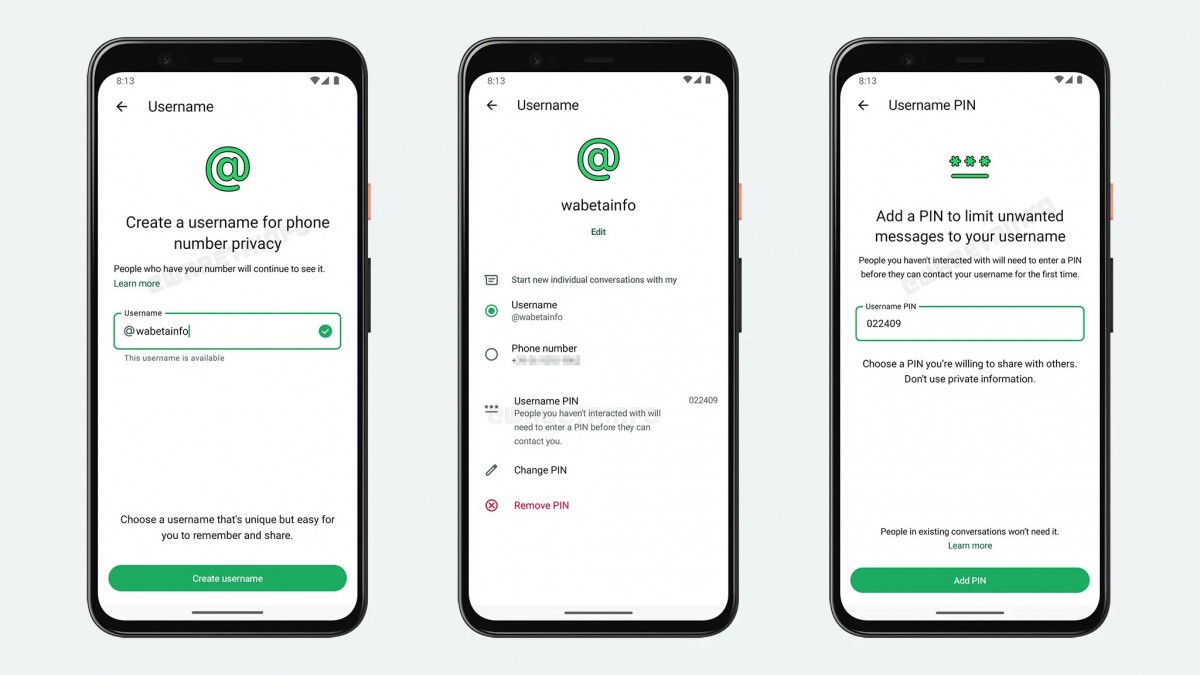
WhatsApp is constantly introducing new features that improve user privacy and make communication easier. One of the biggest updates expected to change how millions of people connect is the WhatsApp Username Feature.
Instead of sharing your personal phone number every time someone wants to contact you, WhatsApp now allows users to create a unique username. Similar to social media platforms like Instagram, Telegram, and X (formerly Twitter), your username becomes your digital identity, making conversations more secure and private.
Whether you’re an individual, business owner, freelancer, content creator, or student, this new feature offers a safer and more convenient way to communicate.
In this complete guide, you’ll learn everything about WhatsApp usernames, how they work, how to create one, the benefits, eligibility rules, privacy improvements, and answers to common questions.
What Is the WhatsApp Username Feature?
The WhatsApp Username Feature allows users to create a unique public username instead of sharing their phone number with everyone.
For years, WhatsApp required every conversation to begin with a phone number. While simple, this raised privacy concerns because users had to expose their personal mobile numbers to strangers, clients, online sellers, or community members.
With usernames, people can search for you or connect using your chosen username without immediately seeing your phone number.
For example:
Instead of giving someone:
+1 647 XXX XXXX
You can simply share:
@johnsmith
or
@techworld
This makes connecting much easier while protecting personal information.
Benefits of the WhatsApp Username Feature
The new username system offers several advantages that improve both privacy and convenience.
1. Better Privacy Protection
The biggest benefit is enhanced privacy.
You no longer need to reveal your personal phone number when chatting with new people.
This is especially useful for:
- Online businesses
- Freelancers
- Marketplace sellers
- Students
- Community groups
- Networking events
2. Easier to Share
Usernames are much easier to remember than long phone numbers.
Instead of saying:
“Save my number.”
You can simply say:
“Message me on WhatsApp at @username.”
3. Professional Identity
Businesses can create recognizable usernames that match their branding.
Examples:
- @mycompany
- @travelagency
- @johndesigner
- @techsupport
This creates a more professional appearance.
4. Improved Security
Since your number isn’t immediately visible to everyone, the chances of spam calls, unwanted messages, and data exposure become significantly lower.
5. Cross-Platform Consistency
Many users prefer having the same username across multiple platforms.
For example:
Instagram:
@creativehub
Facebook:
Creative Hub
WhatsApp:
@creativehub
Using the same username everywhere helps customers and friends easily identify you.
How to Create a WhatsApp Username
Creating a username is a simple process once the feature becomes available for your account.
Follow these steps:
Step 1
Open WhatsApp.
Step 2
Go to Settings.
Step 3
Tap your profile.
Step 4
Select Username.
Step 5
Enter your desired username.
Step 6
If the username is available, WhatsApp will display a green confirmation.
Step 7
Save your username.
Once saved, others can find you using your username instead of your phone number.
WhatsApp Username Rules
WhatsApp has introduced several rules to ensure usernames remain unique and secure.
Generally, a username:
- Must be unique.
- Cannot already belong to another user.
- Cannot start with “www.”
- Cannot end with a domain like “.com”.
- Cannot contain only numbers.
- Must include at least one letter.
- May include numbers.
- May include periods and underscores.
- Cannot contain spaces.
- Cannot include prohibited words.
- Cannot impersonate official organizations.
- Must follow WhatsApp Community Guidelines.
If your chosen username isn’t available, you’ll need to try another variation.
Examples:
Available:
- john.tech
- ali_786
- sarah.design
- mytravelblog
Unavailable:
- 12345678
- wwwjohn
- company.com
How Usernames Improve WhatsApp Privacy
Privacy has become one of the biggest concerns in online communication.
Previously, every WhatsApp conversation exposed your personal phone number.
Now, usernames act as an additional privacy layer.
This means:
- New contacts may only see your username.
- Your phone number stays hidden when appropriate.
- You can interact with strangers more safely.
- Businesses can communicate professionally.
- Scammers have less access to personal information.
This feature makes WhatsApp much more comparable to modern messaging platforms.
Who Should Use a WhatsApp Username?
Almost everyone can benefit from this feature.
It is particularly useful for:
Small Businesses
Share your username instead of your personal number.
Freelancers
Protect your private number while communicating with clients.
Online Sellers
Safely interact with buyers.
Content Creators
Share one simple username across all social platforms.
Students
Connect with classmates without exposing personal contact information.
Professionals
Network more securely during conferences and business events.
Tips for Choosing the Best WhatsApp Username
A good username should be:
- Short
- Easy to remember
- Easy to spell
- Professional
- Consistent across social media
Examples:
- @alexwrites
- @fitcoach
- @techdaily
- @travelwithsam
- @designstudio
Avoid:
- Long strings of numbers
- Difficult spellings
- Random symbols
- Offensive language
Is the WhatsApp Username Feature available for everyone?
The feature is being rolled out gradually. Some users may receive it before others, depending on their WhatsApp version and account.
Can I change my username later?
Yes. WhatsApp allows users to update their username, although availability depends on whether the new username is already taken.
Will people still see my phone number?
Depending on your privacy settings and how the conversation starts, your phone number may remain hidden when users contact you through your username.
Can two users have the same username?
No. Every username is unique, similar to Instagram or Telegram.
Is the feature free?
Yes. WhatsApp usernames are available at no additional cost.
