
In the world of search engine optimization, external backlinks get all the love. Marketing teams spend thousands of dollars, launch massive outreach campaigns, and chase guest post opportunities with one goal in mind: getting other websites to vouch for them. While those external signals are incredibly important, this intense focus on backlinks causes many people to overlook a powerful optimization tool they already have complete control over: internal linking.
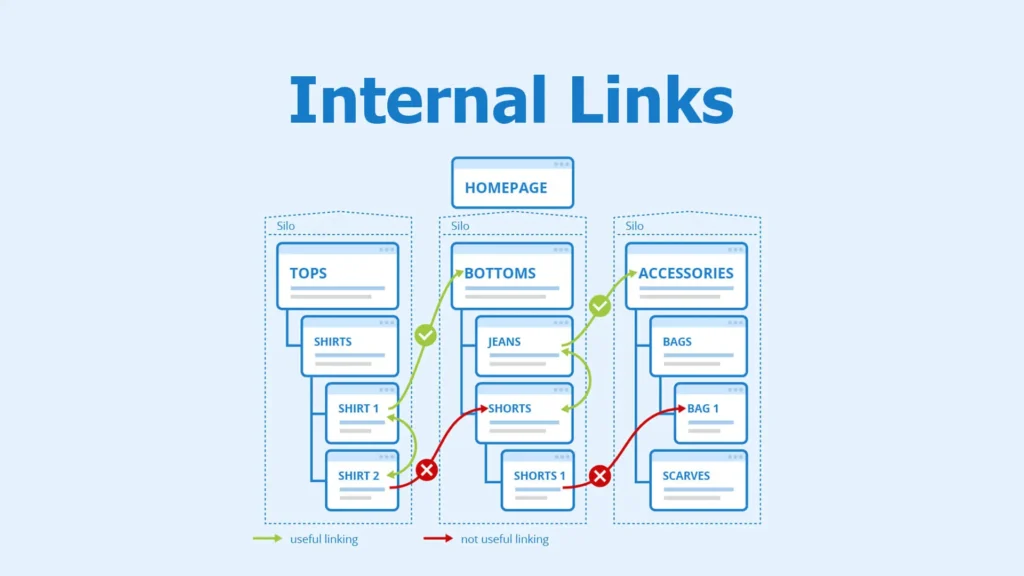
Internal linking is simply the practice of connecting one page on your domain to another page on that same domain. Unlike external links, which force you to rely on other website owners, your internal link architecture is entirely up to you. It serves as the physical infrastructure of your website. It controls how authority flows through your pages, how search engine bots discover your content, and how human visitors navigate your site.
When you neglect this structure, even a website with great backlinks will struggle to rank. Let’s look at how internal linking works behind the scenes, why search engines care about it so much, and how you can build a link distribution system that gets results.
How Search Engines Actually View Your Site’s Structure
To understand why internal linking is so underrated, we have to look at how modern search engine crawlers work. Google and other search engines don’t see a website as a single text document. Instead, they view your domain as a web of interconnected nodes.
1. Distributing Authority (The PageRank Effect)
Even though modern algorithms use hundreds of complex signals, Google’s original foundation—PageRank—is still a core part of how it ranks websites. PageRank treats every link as a vote of confidence. When a high-quality external site links to your homepage, that homepage gets a major boost in authority.
If your homepage doesn’t pass that authority down to other pages through internal links, that value stays trapped at the top. By strategically linking from your most authoritative pages to your product, service, or deep informational pages, you pass that ranking power directly to the parts of your site that need it most.
2. Crawl Efficiency and Finding New Content
Search engine bots explore the internet by following hyperlinks. If you have a page on your site that has zero internal links pointing to it, it becomes an “orphan page.” Search bots can’t easily find these pages, which means they won’t get indexed and they won’t rank.
On top of that, search engines assign a specific “crawl budget” to every website—a limit on how many of your pages a bot will look at during a single visit. A clean, shallow internal link structure ensures that bots can find every single page on your site within three clicks from the homepage, making the most of your crawl budget.
3. Adding Context with Anchor Text
Anchor text—the clickable words that hold a hyperlink—tells search engines exactly what the destination page is about. When external sites link to you, you can’t control what words they use; they often use generic phrases like “click here” or “website.”
With internal links, you have total control over your anchor text. This means you can use descriptive keywords and natural phrases to tell search engine bots exactly what a page covers, which strengthens your relevance for those specific search terms.
The Pillar-Cluster Model: Organizing for Success
An unplanned, random approach to internal links will confuse search engines rather than help them. To get the best results, successful websites organize their content using a framework called the Pillar-Cluster model. This approach groups your content by topic rather than the date it was published.
The Pillar Page
A pillar page is a comprehensive, broad guide about a core topic. For example, an accounting firm might write a massive page titled “The Complete Guide to Corporate Tax.” This page is designed to target highly competitive, high-volume search terms. Because it covers a broad topic, it introduces a lot of sub-topics without diving too deep into every single one.
Cluster Content
Cluster content consists of shorter, highly focused articles that deep-dive into the sub-topics mentioned on the pillar page. Using our accounting example, your cluster pieces might look like this:
- “How to Claim R&D Tax Incentives”
- “Corporate Tax Deadlines for Small Businesses”
- “Understanding Capital Gains Deductions”
Making the Connections
The real optimization happens in how these pages link to each other:
- The Pillar Page links down to every single Cluster Page, showing search engines that you cover these sub-topics in detail.
- Every Cluster Page links back up to the main Pillar Page, passing authority right back to your core content asset.
- Relevant Cluster Pages link across to each other, allowing readers and search bots to move easily between related ideas.
This loop creates a tightly organized topical hub. When search engines see this structured cluster, they recognize your website as a genuine authority on the broader subject, raising the rankings for every page in that group.
The Human Side: Keeping Users Engaged
While technical crawl paths matter, internal linking also changes how real people interact with your site. Search engines track these behavioral signals closely to figure out if your content is actually helpful.
Keeping Bounce Rates Low
A bounce happens when someone visits a page from a search result and leaves your site without clicking anything else. If a detailed blog post has zero internal links, the reader finishes the text and closes the tab. By adding natural, contextual internal links that offer a logical next step, you give users an easy way to stay on your site and continue reading.
Increasing Pages Per Visit and Dwell Time
Internal links act as signposts that guide visitors deeper into your website. As a user clicks from an educational article to a case study, and then over to a services page, their total time on your site goes up. Search engines see these longer, multi-page visits as a clear sign that your website provides high-quality value.
4 Common Internal Linking Mistakes to Avoid
Even though the concept is simple, many businesses handle internal linking in a way that hurts their rankings. When auditing websites, SEO professionals regularly run into these four issues:
1. Using Lifeless Anchor Text
Linking words like “read more,” “click here,” or “this post” wastes a massive opportunity to provide helpful context. Your anchor text should always give a clear hint about what the next page is actually about.
2. Stuffing Too Many Links on a Single Page
Every page has a limited amount of authority it can share. If a short article contains 50 different links, the value sent to each individual link is incredibly diluted. Plus, a wall of blue hyperlinks makes text hard to read and looks spammy to your visitors. Keep your links limited to where they add real, practical value.
3. Linking to Broken Pages or Redirects
Websites change over time, and pages get deleted or moved. If your internal links point to broken 404 pages or force bots to go through a long chain of redirects, you waste your crawl budget and frustrate your users. Regular site check-ups are essential to make sure all links point directly to working pages.
4. Over-Optimizing the Exact Same Keyword
While using keywords in your anchor text is great, using the exact same phrase hundreds of times looks robotic and can trigger spam filters. If every single link pointing to your main service page uses the rigid phrase “best local accountant,” it looks unnatural. Mix things up by using natural variations and blending your links smoothly into sentences.
A Practical Blueprint for Your Site
To turn your internal linking into a deliberate asset, follow this straightforward process:
Step 1: Map Out Your High-Value Pages
Identify the pages on your site that actually make money—like your service offerings, product catalogs, or contact pages. These pages rarely get natural external backlinks because other sites prefer to link to informational articles. These commercial pages are the ones that need your internal link authority the most.
Step 2: Find Your Most Authoritative Content
Use a basic SEO tool to check which pages on your domain have the most strength or the most external links. Usually, your homepage will be number one, followed by older blog posts or resources that have been shared over the years.
Step 3: Connect the Two
Add natural, contextual links from those high-authority informational pages directly to your commercial pages. For example, if an old blog post about business maintenance gets steady search traffic, add a link inside that text pointing to your commercial “Repair Services” page.
Step 4: Make It Part of Your Writing Routine
Internal linking shouldn’t be a one-time project. It needs to be part of your content creation process. Every time you write and schedule a new piece of content, build in two steps:
- Inbound Links: Find 3 to 5 existing articles on your site that match the topic, and add links from those older posts pointing to your new one.
- Outbound Links: Inside the new post itself, add 3 to 5 links pointing out to your existing pillar pages, related articles, or service pages.
Building a Resilient Website
Depending entirely on external backlinks to drive your search rankings is a risky strategy. It puts your growth completely in the hands of third parties.
By taking charge of your internal link architecture, fixing broken paths, and organizing your pages into clear topical groups, you build a sturdy website structure from the inside out. Internal linking doesn’t require outside outreach budgets or permission from other webmasters. It just takes an organized plan and a commitment to keeping your site clean, structured, and easy to navigate.
